Native vs Hybrid vs Cross-Platform Apps: Complete Comparison Guide
You have decided to create a mobile app. Brilliant. But before you can discuss features, timelines, or budget, you face a fundamental architectural decision that will shape all of the following: How should your app be built?
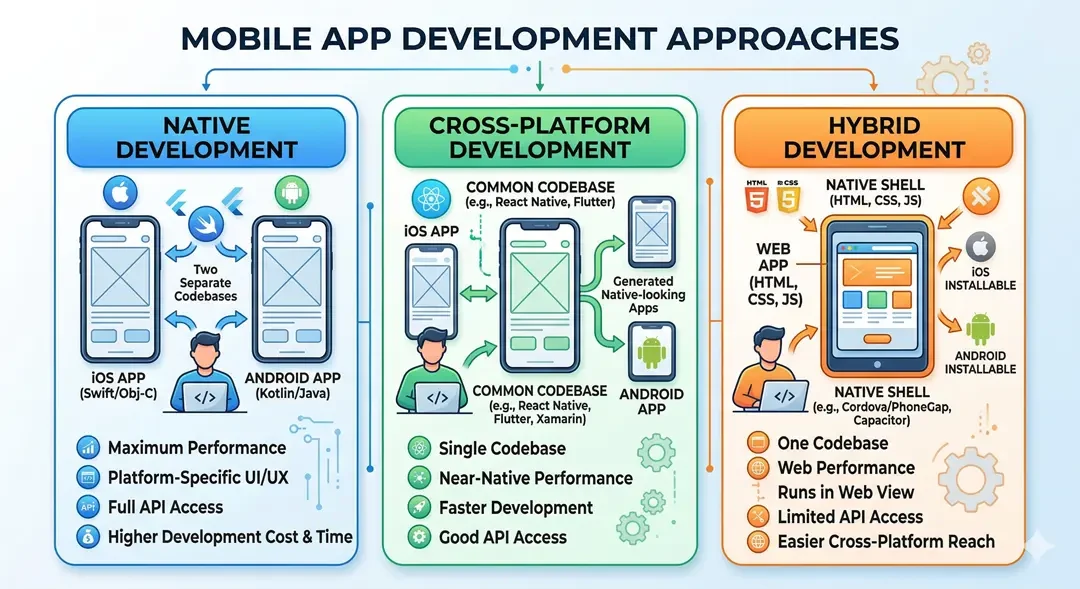
There are three different approaches, each with passionate supporters and real merit. Embedded development creates separate apps for iOS and Android using platform-specific technologies. Cross-platform development uses frameworks like Flutter or React Native to build apps for both platforms from shared code. Hybrid development wraps web technology in a native shell, creating apps that run on both platforms through an embedded browser.
This isn't just a technical choice - it's a business decision that affects your budget, timeline, user experience, long-term maintenance costs, and the ability to grow your app over time. Making the wrong choice doesn't mean your app won't work, but it could mean you end up spending twice as much as you need to, or deliver an experience that will frustrate rather than delight users.
After learning about Flutter vs React Native in detail, this guide zooms out to examine the entire scenario. By the end, you will understand each approach well and have clarity on which approach is best for your specific situation.
Understanding the Three Approaches
Before we compare, let's ensure a clear understanding of what each approach actually means.
Native Development: Platform-Specific Excellence
Native development means building your app using tools, languages, and frameworks designed specifically for each platform. For iOS, this means Swift (or the older Objective-C) with Apple's Xcode development environment. For Android, this means Kotlin (or older Java) with Google's Android Studio.
When you build native, you speak the native language of each platform. All functions the device offers - cameras, sensors, Bluetooth, gestures, animations - are directly accessible. Your app integrates seamlessly with the operating system, naturally follows the platform's conventions, and receives updates and new features as soon as Apple or Google release them.
Native apps look native because they are integrated. Scrolling physics, button behavior, navigation patterns – everything matches what users expect from their devices. It is not an imitation or approximation; it's the real thing.
The trade-off is obvious: building for both platforms means creating two separate apps. Two codebases to write, two codebases to maintain, two sets of bugs to fix, two teams to deploy (or one team with two skill sets). The apps do the same thing, but they are completely separate projects under the hood.
Large apps built natively include most Apple applications (designed to showcase iOS features), many Google applications (especially those that showcase Android features), and performance-critical apps such as advanced games, augmented reality apps, and apps that require deep device integration.
Cross-Platform Development: Shared Code, Native Results
Cross-platform development uses frameworks that allow developers to write code once and deploy it on both iOS and Android. The two main frameworks – Flutter (from Google) and React Native (from Meta) – have different technical approaches, but share the same goal: dramatically reduce the effort of supporting multiple platforms.
Modern cross-platform frameworks have matured significantly. Apps built with Flutter or React Native look and feel native to most users. Performance matches or approaches native apps for typical use cases. The apps appear alongside native apps in the App Store, with no indication that they are made differently.
The main advantage is efficiency. Instead of maintaining two separate codebases, you maintain one. Instead of fixing bugs twice, you fix them once. Instead of needing iOS developers and Android developers, you need developers skilled in your chosen framework who can build for both platforms.
Cross-platform development has evolved beyond mobile. Flutter now supports web, desktop (Windows, macOS, Linux) and embedded devices from a single codebase. React Native has expanded to the web through React Native Web. This cross-platform capability extends efficiencies beyond just iOS and Android.
Major apps built with the cross-platform framework include Instagram, Facebook, Walmart (React Native), Google Pay, BMW and Alibaba (Flutter). These are sophisticated, high-traffic applications that demonstrate that cross-platform frameworks can handle demanding requirements.
Hybrid Development: Web Technology in Native Clothing
Hybrid development takes a fundamentally different approach. Instead of compiling native code, hybrid apps embed web technologies (HTML, CSS, JavaScript) into the native application shell. Your app is essentially a specialized browser that displays your web application, with bridges that provide access to certain device functions.
Frameworks like Ionic, Cordova (formerly PhoneGap) and Capacitor enable hybrid development. Developers build using familiar web technologies, then package the result as an app that can be distributed through app stores.
The appeal for organizations with web development expertise is obvious. The same developers who create your website can also create your mobile app. Code can also be shared between web and mobile versions. The learning curve for web developers is minimal compared to learning native or cross-platform mobile development.
However, hybrid apps run through a WebView- essentially a browser component - which introduces a layer between your code and the device. This affects performance, especially for complex interfaces or animations. Hybrid apps can feel slow compared to native cross-platform options, and require significant effort to achieve interactions with true native feel.
The popularity of hybrid development has declined as cross-platform frameworks have improved. Many apps that could have been hybrid in 2018 will be built with Flutter or React Native in 2026. However, hybrid is still viable for some use cases, especially internal enterprise applications or apps with primarily content-centric functionality.
Performance: Separating Fact from Folklore
Performance discussions around mobile development approaches often generate more heat than light. Let's see what really matters for real applications.
Native Performance: The Benchmark
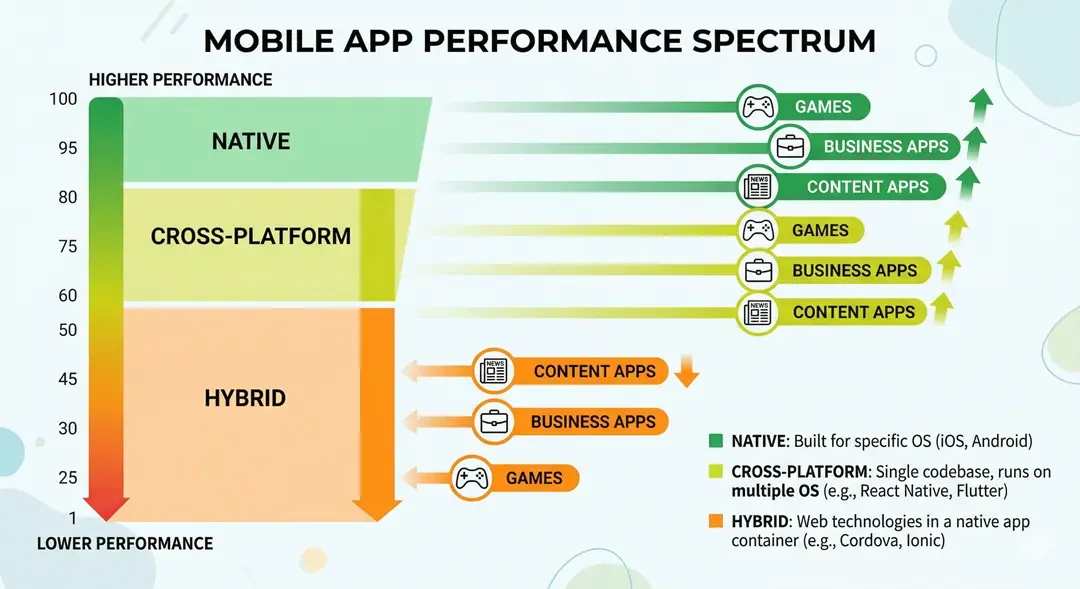
Built-in apps set the performance standard. The code is compiled directly into machine instructions optimized for each platform's processor. There are no interpretation layers, no bridges, no abstractions - just your code running as efficiently as the platform allows.
For most applications, this performance limit is much higher than necessary. A shopping app, a social feed, an ordering system - these don't demand every millisecond of performance a device can provide. The app loads quickly, scrolls smoothly and responds quickly. Users never think about performance because nothing triggers that awareness.
Where pristine performance becomes essential in demanding applications. Hi-fi games that render complex 3D graphics at 60 or 120 frames per second require native skills. Augmented reality applications benefit from native customization, providing overlays while processing camera feeds in real-time. Video editing apps that manipulate large files need every performance advantage available.
For these demanding applications, native development is not only preferable, but often necessary. The performance difference between native and alternative, while small, is still significant when pushing your device's capabilities to its limits.
Cross-Platform Performance: Narrowing the Gap
The performance narrative around cross-platform development has changed dramatically. Flutter compiles to native ARM code, running directly on the device processor without any interpretation. React Native's new architecture eliminates much of the bridge overhead that has historically caused performance concerns.
For typical business applications, cross-platform performance is essentially indistinguishable from the original. Users browsing product listings, filling out forms, viewing content and navigating between screens will not notice any performance difference. Benchmarks may show small gaps, but human perception does not.
Where cross-platform frameworks still show limitations is in extreme scenarios. Complex animations involving multiple elements at once can drop frames that native implementations easily handle. For rapid UI updates - think real-time audio visualizations or high-frequency data displays - can reveal frameworks. Applications that require extensive communication with platform-specific native code may experience latency that can be avoided with a pure native implementation.
These restrictions affect a small percentage of applications. For most business apps, cross-platform performance is more than enough.
Hybrid Performance: The Honest Assessment
Hybrid apps face inherent performance bottlenecks that architectural improvements cannot fully overcome. Running through a WebView means that your application code runs in a JavaScript environment in the browser component of your app. Each layer adds overhead.
The effect varies depending on the type of application. Content-heavy apps that primarily display text, images and simple interactions can work acceptably. Users may find that the initial loading is a bit slow or that the animation sometimes stutters, but the functionality works fine.
Interactive-heavy apps with complex animations, frequent updates or sophisticated gestures highlight hybrid limitations more clearly. The difference between the hybrid and native screen becomes noticeable to the user - scrolling feels a bit slow, transitions seem choppy, touch responses lag noticeably.
Hybrid frameworks have improved significantly and modern tools are powerful enough to compensate for some of the overhead. But hybrid apps will never match native or modern cross-platform performance. If performance is critical to your user experience, hybrid development needs to be carefully considered.
 Development Cost and Timeline: The Business Reality
For most businesses, cost and timelines are more important than technical performance benchmarks. Understanding how each approach affects budget and schedule enables informed decisions to be made.
Native Development Economics
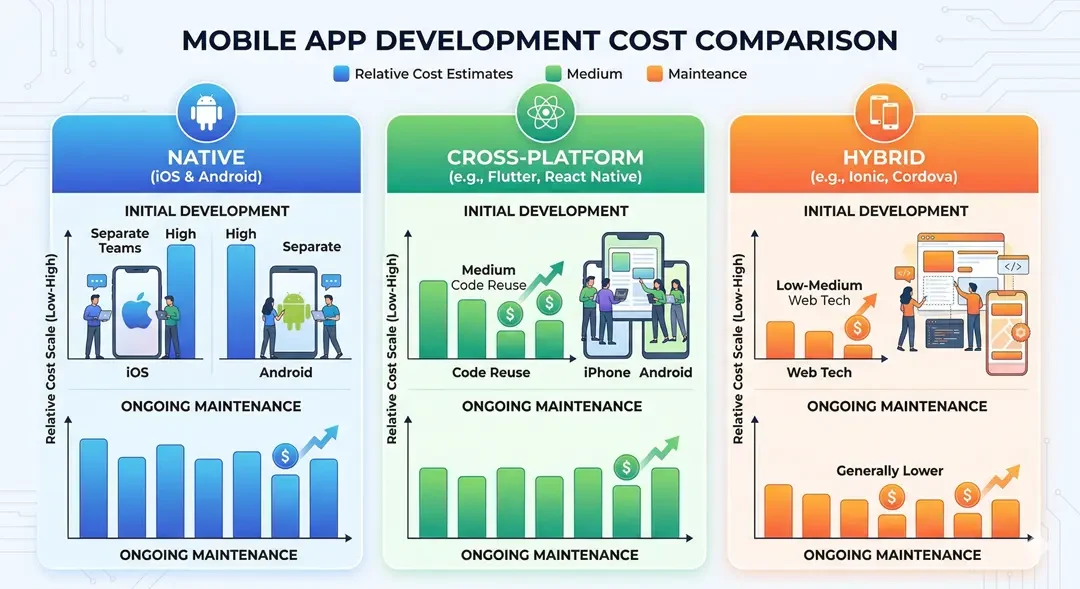
Native development for both platforms means effectively building your app twice. The two codebases require roughly double the development effort, although some efficiency comes from shared architectural thinking and asset reuse.
For a medium-complexity application that might cost $40,000-$70,000 (₹33L-₹58L) to build across platforms, native development for both iOS and Android typically runs $70,000-$130,000 (₹58L–₹1.08Cr). The premium varies from 60-100% depending on how much platform-specific optimization and polishing you need.
The timeline effects are similar. Where cross-platform development can take four months, parallel native development takes about the same time with larger teams, or significantly longer with sequential development. Most organizations that build natively either accept longer timelines or use separate iOS and Android teams working together.
Ongoing maintenance also increases diversity. Each bug fix potentially requires implementation twice. Adding each feature requires double development. Each platform update may require adaptations to both codebases. Over a multi-year product life cycle, these compounded costs significantly exceed the initial development premium.
However, native development costs less when building for just one platform than cross-platform. If your users are mostly iPhone users (or mostly Android users), it costs less to build natively for one platform than to build cross-platform for both. Cross-platform premium only makes sense if you really need both platforms.
Cross-Platform Economics
The cost advantage of cross-platform development comes from a unified code base. One team builds one app that is distributed to both platforms. The development effort is typically 50–70% of the corresponding original development need for both platforms.
For the same medium complexity application, cross-platform development typically costs $40,000-$70,000 (₹33L-₹58L), while for basic iOS plus Android it is $70,000-$130,000 (₹58L-₹1.08Cr).
These savings continue throughout the product's life cycle. Error correction happens once. Functions are implemented once. Platform updates require one customization, not two. Over three to five years of active development and maintenance, the cumulative savings often exceed the initial development savings.
Developer availability affects real costs. Flutter developers earn slightly higher rates than React Native developers, who earn slightly higher rates than typical JavaScript developers. But all cross-platform developers are less expensive than hiring separate iOS and Android experts.
Our detailed guide on mobile app development costs in India provides comprehensive pricing across different app types and complexity levels.
Hybrid Economics
Hybrid development offers the lowest initial development costs for teams with existing web development expertise. Leveraging web skills instead of learning mobile-specific technologies reduces training time and enables existing team members to contribute.
Development costs for hybrid apps can be 20-40% less than cross-platform costs for simple to medium complexity applications. A hybrid approach can deliver a functional app for $25,000-$50,000 (₹21 lakh-₹42 lakh), where cross-platform costs $40,000-$70,000 (₹33 lakh-₹58 lakh).
However, these savings come with caveats. Achieving native-feeling performance and appearance in hybrid apps often requires significant optimization efforts, potentially reducing cost benefits. User experience compromises can affect usage and retention, causing indirect costs that can exceed development savings.
Hybrid development makes the most economic sense for internal enterprise applications where user experiences differ from standard consumer apps, or for applications that are essentially mobile-optimized versions of existing web applications.
User Experience: What Users Actually Feel
Technical architecture means little to users – they care about how your app feels to use. Each approach has a different impact on the user experience.
Native User Experience
Native apps are fully integrated with the platform because they are built from platform components. A native iOS app uses actual iOS buttons, navigation patterns, scrolling behavior, and interaction models. It looks and feels like other iOS apps users interact with daily.
This cross-platform compatibility extends to operating system features. Native apps can quickly adopt new iOS or Android features - new gesture types, new interface paradigms, new system integrations. When Apple introduces a new feature, native iOS apps can implement it immediately.
Accessibility features work seamlessly in integrated apps. VoiceOver on iOS and TalkBack on Android - including screen readers for visually impaired users - work best with integrated interface components. Native apps achieve accessibility compliance more easily without additional effort.
The user experience range for native apps is essentially unlimited. Whatever the platform can do, native apps can also do. Whatever Apple or Google shows in their Showcase apps can be implemented by native developers.
Cross-Platform User Experience
Modern cross-platform frameworks provide user experiences that most users cannot distinguish from the original. Flutter's content and Cupertino widget libraries provide cross-platform interfaces. React Native renders true native components, ensuring true platform behavior.
The primary consideration with cross-platform development is conscious user experience. Native apps automatically follow platform conventions. Cross-platform apps follow platform conventions when developers explicitly enforce them. A less experienced or less conscientious development team can ship cross-platform apps that look a little rough on one or both platforms.
Well-executed cross-platform apps feel truly native. Instagram's React Native implementation, Google's Flutter implementation - these apps don't feel like compromises. What users do not know is that these were not originally created.
For most applications, the practical user experience difference between native and well-executed cross-platform development is negligible. The qualification "well done" means a lot – the quality of the implementation affects the user experience far more than the choice of technology.
Hybrid User Experience
Hybrid apps face inherent user experience challenges. Web technologies were not designed for mobile app interfaces, and even with sophisticated frameworks, hybrid apps often feel a little different than native applications.
Rolling behavior is immediately apparent. Native scrolling has specific physics – speed, bounce, deceleration curves – that users have internalized through years of mobile use. Online scrolling behaves differently. Users may not consciously identify the difference, but something feels subtly wrong.
Transitions and animations present similar challenges. Built-in platforms optimize these to a large extent. Hybrid apps have to recreate them with web technologies, and rarely achieve the same results.
Some hybrid apps overcome these limitations through extensive customization and custom implementation. But hybrid apps require significant effort to achieve a native-quality user experience that potentially negates their cost benefits.
For applications where user experience is a competitive differentiator - consumer apps compete for engagement and retention - hybrid development requires careful evaluation.
Feature Access and Platform Capabilities
Mobile devices provide rich features beyond simple display and interaction. Camera, GPS, Bluetooth, biometrics, sensors, local storage, background processing – your app's potential depends on having access to these capabilities.
Native: Complete Access
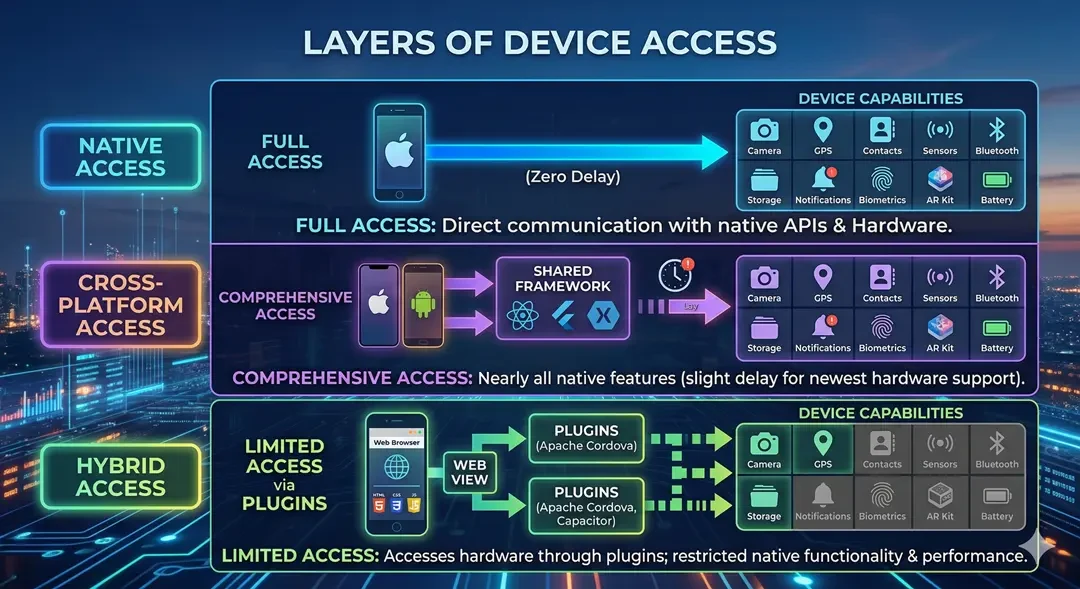
Built-in development provides immediate, full access to all platform features. When Apple adds new sensor hardware, native developers can use it. When Android introduces new API categories, native developers can implement them. There is nothing between your code and the device.
This complete accessibility matters most for apps that push the limits of the device. Fitness apps that use advanced motion sensors. Audio apps that require low-latency processing. Smart home apps that communicate via Bluetooth or local network. Augmented reality apps that combine cameras, motion sensors and real-time graphics.
The native development platform also provides optimal integration with the ecosystem. Apple Watch complications, iOS widgets, Siri shortcuts, iMessage apps, SharePlay integration - these iOS-specific features work best (or only) with native development. The same Android-specific features like home screen widgets, Android Auto and Wear OS integration work better.
Cross-Platform: Comprehensive Coverage
Cross-platform frameworks provide access to most device functions through platform channels - bridges that allow framework code to implement native platform functionality.
Camera access, location services, biometric authentication, local storage, push notifications, in-app purchases – the features most apps need are well supported in both Flutter and React Native. The official packages and mature community libraries fully cover common use cases.
Where cross-platform frameworks fall short are cutting-edge platform features. When Apple announces a new feature at WWDC, native developers can implement it immediately. Flutter and React Native developers wait for framework updates or community packs - typically weeks to months.
For most business applications, this delay is rarely significant. You probably didn't implement the latest iOS 18 features the week they were announced. But for apps that require cutting-edge platform features, this lag is important to consider.
Complex hardware integrations sometimes make cross-platform frameworks challenging. Specific Bluetooth protocols, advanced camera configurations, or unusual sensor combinations may require custom native code modules, increasing complexity and reducing cross-platform benefits.
Hybrid: Meaningful Limitations
Hybrid apps access device functionality through plugins that connect web code to the native API. Key features – camera, location, storage, notifications – have mature plugins. But the abstraction layer introduces limitations.
Performance-intensive capabilities are most affected. Processing camera frames for real-time analysis, handling high-frequency sensor data, or handling complex Bluetooth communications can be more than a hybrid bridge can effectively support.
Platform-specific features often lack hybrid support altogether. iOS-specific features such as widgets, watch complications, or system integration usually require native code. Hybrid frameworks focus on overlapping capabilities across platforms, not platform-specific features.
For apps with modest demands on device capacity – displaying content, taking the occasional photo, using location as a reference - hybrid access is sufficient. For apps whose value proposition depends on sophisticated device integration, hybrid limitations can prove prohibitive.
 When to Choose Each Approach
With a broader understanding of each approach, let's clarify when each approach makes sense.
Choose Native Development When...
Performance is very important to your application. Games with complex graphics, augmented reality applications, video processing apps, or applications that require real-time audio processing benefit from native optimization. If your app's core value proposition depends on squeezing maximum performance out of your device's hardware, embedded development ensures you're not limited by framework costs.
You build a single platform. If your user base is mostly iOS (or mostly Android), it costs less to build natively for that one platform than cross-platform development. Cross-platform efficiency gains only come when you really need both platforms.
You need deep platform integration. Apps that need to feel like natural extensions of the operating system-widgets, system integrations, watch apps, platform-specific features-achieve this most intuitively through native development.
Budget and timeline make room for investments. Native development for both platforms costs more and usually takes longer. If budget and schedule constraints are flexible, native development provides the highest possible quality threshold.
You have (or can create) a team with platform-specific expertise. Embedded development requires iOS developers and Android developers – different skill sets, different tools, different code bases. If your organization can support this expertise, native development works well.
Choose Cross-Platform Development When...
You need both iOS and Android, and you have budget or deadline constraints. This is the most common scenario. Most businesses want to reach users on both platforms, but cannot double the development investment. Cross-platform development delivers efficiently across both platforms.
Your application is business focused rather than performance critical. E-commerce apps, ordering apps, content apps, productivity tools, social features – they don't require built-in performance optimization. Cross-platform frameworks handle them just fine.
You want a unified team that maintains a unified codebase. Instead of managing separate iOS and Android efforts, a single cross-platform team maintains a single codebase. This simplifies administration, reduces coordination costs and ensures consistent function rollout across all platforms.
You create an MVP to validate a concept. When testing marketability, development speed and cost-effectiveness matter more than final polish. Cross-platform development gets your product to users faster, enabling learning and iteration before larger investments.
Expansion to web or desktop is possible in the future. Flutter's cross-platform features and React Native Web provide a path towards broad platform support from your mobile code base. If integrated development across mobile, web and desktop appeals, a cross-platform framework provides that opportunity.
Our guide to choosing the right software development company will help you evaluate partners for whichever approach you choose.
Choose Hybrid Development When...
You have existing web development expertise and limited mobile experience. Hybrid development allows web developers to create mobile apps without having to learn entirely new technologies. For organizations that have strong online teams but no mobile expertise, hybrid offers an accessible entry point.
Your app is primarily content-centric with minimal interaction complexity. News readers, reference apps, simple content management tools and similar applications do not require sophisticated mobile interfaces. Hybrid development adequately handles content performance.
You build internal business units where consumer grade polish is not expected. Internal applications used by employees have different standards than consumer apps competing for engagement. Hybrid development can provide functional internal units efficiently.
The budget is severely limited and you need something practical rather than optimal. The low cost of hybrid development makes mobile presence accessible to organizations that otherwise cannot afford it. A hybrid app that exists beats a native app that is unavailable.
You create a mobile companion to an existing web application with significant shared functionality. When your mobile app is essentially your web app in an app wrapper-same content, same basic functionality, only available on mobile-hybrid development leverages existing web code.
Real-World Scenarios: Applying the Framework
The abstract guidance becomes clear through concrete examples. Let's look at how different businesses can evaluate their options.
Scenario 1: E-Commerce Startup
Startups starting an online marketplace require iOS and Android apps to reach maximum customers. The budget is limited – around $50,000-$70,000 (₹42 lakh-₹58 lakh) for initial development. From time to time the market is important when competitors establish themselves.
Basic development for both platforms will cost around $90,000-$130,000 (₹75L-₹1.08Cr) – which is well over budget. Even if funding is available, launch timelines for two separate apps are extended by months.
Hybrid development may fit the budget, but creates risk. An e-commerce app needs seamless browsing, product interactions, cart management and payment flow. Users comparing the experience with sophisticated competitors (Amazon, Shopify stores) will notice hybrid limitations.
Cross-platform development is a perfect fit. Flutter or React Native provide both platforms within budget and deadline. The quality of the user experience matches expectations. The start-up secures capital for marketing and operations while achieving competitive app quality.
Recommendation: Cross-platform (Flutter or React Native)
Scenario 2: Fitness Hardware Company
A fitness equipment company needs an app that connects to their hardware via Bluetooth, processes training data in real time, displays dynamic visualizations and syncs with health platforms (Apple Health, Google Fit).
The app requires reliable Bluetooth communication, efficient data processing, responsive visualization and deep platform health integration. Users expect the quality of training apps to match Apple's training apps or Strava.
Hybrid development cannot provide the performance required for real-time data visualization and Bluetooth communication. The difference in user experience will weaken their premium hardware status.
Cross-platform development can work, but Bluetooth communication complexity and healthcare platform integration push the limits. Optimal Bluetooth performance and full health platform integration will require custom native modules, reducing cross-platform benefits.
Built-in development ensures optimal Bluetooth performance, real-time data management and seamless health platform integration. First-class hardware deserves first-class software. The budget generally supports this given hardware margin.
Recommendation: Embedded development for both platforms
Scenario 3: Corporate Internal Tool
A company needs a mobile app for field workers to submit reports, take pictures of job pages, access reference documents and receive assignments. Almost 70% of employees use Android; 30% use iOS. The app is a productivity tool, not a brand showcase.
The cost of basic development-building two separate apps-is more than reasonable for an in-house tool. Employee expectations differ from consumer app expectations; Minor differences in Polish will not affect the adoption.
Cross-platform development delivers efficiently across both platforms. The app's needs-forms, image capture, document viewing, notifications-are within cross-platform capabilities. A unified code base simplifies maintenance for the internal IT team.
Given modest interaction requirements, hybrid development can work. If your organization has strong web development resources and limited mobile expertise, hybrid offers the easiest path to a functional tool.
Recommendation: Preferred across platforms; Hybrid is acceptable if web expertise exists and budget is limited
Scenario 4: Gaming Studio
A game studio develops a puzzle game with sophisticated animations, particle effects and precise touch interactions. The appeal of games depends on intuitive, visually sophisticated experiences.
Hybrid development may not provide the expected performance. Games require consistent frame rates, precise timing and efficient graphics rendering that hybrid frameworks cannot provide.
Cross-platform development with Flutter can work for 2D puzzles without extreme performance requirements. Flutter's rendering engine handles animations well. However, game-specific features (Game Center integration, score charts, achievements) require additional effort.
Embedded development with game engines such as Unity or Unreal makes the most sense for games. These engines are optimized for game development, provide cross-platform distribution from single projects, and provide game-specific features that general mobile frameworks lack.
Recommendation: Native with a game engine (Unity/Unreal) instead of a generic mobile framework
Future Considerations: How the Landscape is Evolving
Technology decisions must not only take into account the current state, but also the trajectory.
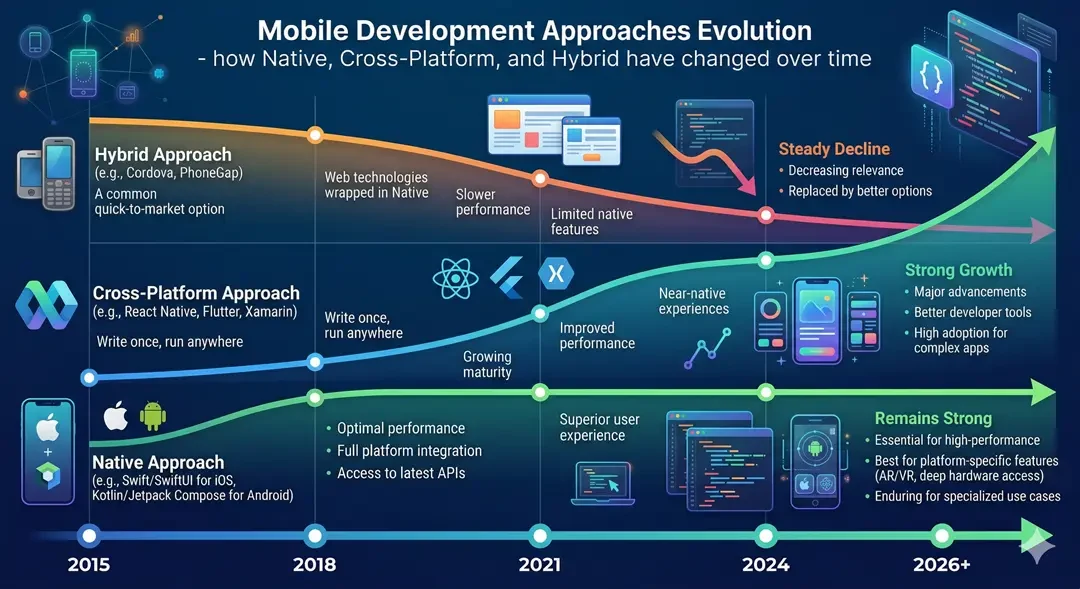
Cross-platform frameworks continue to improve performance, closing the remaining gap with native development. Flutter's roadmap includes continuous optimization and platform expansion. The new architecture of React Native brings significant improvements. The argument for core development based on performance gets weaker every year.
Hybrid development continues to decline as cross-platform frameworks eat away at use cases. For projects where hybrid would have been chosen in 2020, cross-platform in 2026 is usually the better choice. Hybrids remain viable, but occupy a narrow niche.
Embedded development is necessary for platform-pushing applications, but it becomes harder to justify for standard business apps. Apple and Google continue to improve their platforms, ensuring that native development always offers capabilities beyond those offered by cross-platform frameworks.
The practical future of most businesses involves cross-platform development as the default option, with embedded development reserved for specific high-performance or deeply integrated applications.
Conclusion: Making Your Decision
The clear answer to the native vs. hybrid vs. the cross-platform debate for most companies in 2026 is: cross-platform development provides the best balance between quality, cost and flexibility.
When performance is very important, when you are building for a single platform, or when deep platform integration is required, native development is still the right choice. But for standard enterprise applications that require both iOS and Android, it becomes increasingly difficult to justify the premium for native development.
There is still room in hybrid development for content-focused apps, internal tools, and organizations leveraging existing web expertise. However, as cross-platform frameworks have matured, their scope has become limited.
Cross-platform development – especially with Flutter or React Native has become the standard recommendation for most mobile projects. It offers excellent quality on both platforms, significant cost savings over native, and a unified code base that simplifies long-term maintenance.
Whichever approach you choose, quality of workmanship matters more than architecture. A well-built hybrid app performs better than a poorly built native app. A well-implemented cross-platform app provides a better user experience than a hastily implemented basic implementation.
Choose your approach based on your actual needs, not industry hype or developer preference. Then invest in quality execution with skilled partners who have a deep understanding of the chosen technology.
Ready to Build Your Mobile App the Right Way?
At ConsoleOps, we help businesses select the right development approach for their specific needs then execute with excellence. Whether cross-platform makes sense for your budget and requirements, or native development is justified for your use case, we'll guide you to the right decision and deliver exceptional results.
Discuss Your App Project with ConsoleOps →
Let's determine the optimal approach for your goals and build something your users will love.
Frequently Asked Questions
What's the difference between hybrid and cross-platform apps?
Cross-platform apps (Flutter, React Native) compile to native code or use native components, providing near-native performance. Hybrid apps (Ionic, Cordova) run web technologies (HTML, CSS, JavaScript) in a native shell with WebView, which introduces performance overhead. Cross-platform apps look native; Hybrid apps often feel like a website in an app wrapper. Sometimes the terms are used interchangeably, but the technical approaches and results are quite different.
Is native app development dying?
No, but the correct use cases are reduced. Embedded development is essential for performance-critical applications (gaming, AR, video processing), apps that require cutting-edge platform features, and single-platform apps. But for standard business applications that require both platforms, cross-platform development provides exponentially better value. Native development isn't going away - it's becoming more specialized.
Which approach is cheapest for mobile app development?
Hybrid development generally has the lowest initial cost, followed by cross-platform, then native (for both platforms). However, total ownership costs are more important than the initial development costs. Hybrid apps may require more customization to achieve acceptable quality. Cross-platform apps provide the best balance between cost and quality for most projects. Base costs are highest at the beginning, but platform-specific investments are only required when really necessary.
Can cross-platform apps access all phone features?
Cross-platform apps access most device features camera, location, storage, Bluetooth, biometrics, notifications, and more. There is mature support for generic capabilities across major frameworks. Limitations appear with cutting-edge features (available before framework support arrived) and complex hardware integration (which may require custom native modules). For specific business app needs, access to cross-platform features is extensive.
Should startups build native or cross-platform apps?
Most startups need to build across platforms. Startups typically lack budget, need to reach both iOS and Android users, and benefit from rapid development and iteration. Cross-platform development delivers efficiently across both platforms, while preserving capital for marketing and operations. Native development is only worthwhile when the startup's app demands performance or platform features that justify the premium.
How do I decide between Flutter and React Native?
Both give excellent results. If your team knows JavaScript/React, if you're integrating with an existing React web application, or if developer availability in your market favors React Native, choose React Native. If you're starting from scratch, if design consistency across platforms matters a lot, or if you're hoping to expand to web and desktop, choose Flutter. For a detailed comparison, check out our Flutter vs React Native guide.