The Complete Guide to Business Management Software in 2026: ERP, CRM & POS Explained
Running a growing business in 2026 feels like conducting an orchestra where half the musicians play different notes. Sales data is in one tool, inventory in another spreadsheet, customer conversations are scattered across emails and WhatsApp, and your accountant is still asking about last month's numbers. Does that sound familiar?
This is exactly the problem that business management software is designed to solve. And yet, walk into any boardroom discussion about ERP, CRM, or POS systems, and you'll find that most decision makers are genuinely confused about which tool does what-let alone which tool their business actually needs in the first place.
This guide cuts through the jargon. By the end, you'll understand exactly what each system does, how they work together, what they cost, and how to decide which one to implement first. Whether you're running a 10-person startup or growing a 500-employee business in Jaipur, the framework here will save you from the costliest mistake businesses will make in 2026: buying the wrong software for the wrong reason.
What is Business Management Software, Really?
Business management software is a broad term for digital systems that help businesses run their day-to-day operations - finance, sales, inventory, customer relations, human resources and everything in between. The three biggest categories you will encounter are:
ERP (Enterprise Resource Planning) - The back-office brain
CRM (Customer Relationship Management) - Sales and Customer Engagement Engine
POS (Point of Sale) - Front-line transaction system
These are not competitors. They are experts. The mistake most businesses make is to think of them as interchangeable, and then wonder why their "all-in-one CRM" can't handle their warehouse properly.
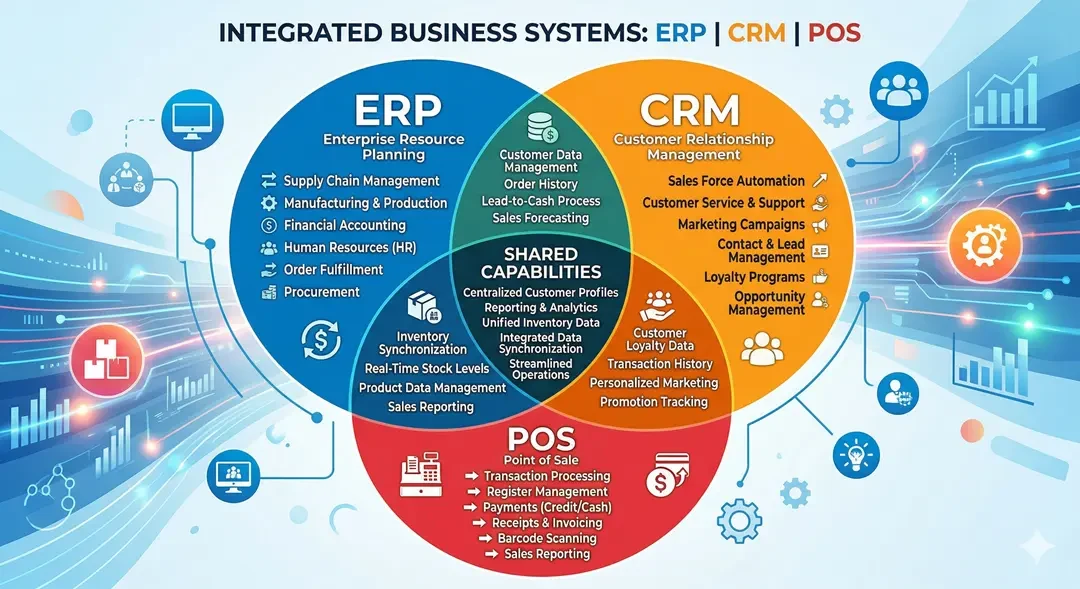
ERP: The Operational Backbone
Enterprise Resource Planning (ERP) software integrates all of your back-office functions accounting, inventory, purchasing, HR, manufacturing, supply chain, and reporting into one connected system. Think of ERP as your company's central nervous system. ERP automatically updates inventory when a sales order comes in, triggers purchase orders when inventory is low, creates invoices, and reflects revenue in financial reports all without touching a spreadsheet.
Who actually needs an ERP?
You probably need an ERP if:
● You use more than 4-5 offline tools for different tasks
● Your team spends hours every week reconciling data between systems
● You have multiple locations, warehouses or business units
● Your finance team cannot generate real-time reports
● You move quickly and start to see the operating cracks
Manufacturing companies, distributors, multi-branch retailers and service companies with complex project tracking benefit the most. If you are a 5 person consultant, you definitely don't need this right now.
Popular ERP options in 2026
The market is divided between giants and challengers. SAP and Oracle NetSuite dominate the enterprise sector, while Odoo, Zoho One and Microsoft Dynamics 365 Business Central are SMB favourites. Then there's custom ERP - software designed specifically for your workflow, which we'll come back to.
If you're weighing custom versus off-the-shelf, our in-depth analysis in Custom ERP versus off-the-shelf (SAP, Odoo, Zoho) goes into detail about the long-term cost math.
CRM: Where Your Customer Relationships Live
Customer Relationship Management (CRM) software is built around one job: manage every interaction your company has with prospects and customers. Where ERP is internal, CRM is external.
A good CRM tracks every email, call, meeting, deal stage and support ticket related to a customer. It tells your sales team which leads are popular, which deals are stuck, and which customers are at risk of churn. It tells the marketing team which campaigns are working. And it gives your support team the complete story of the customer as soon as they call.
What a CRM actually does
● Lead and Pipeline Management - Track all prospects from first contact to closed deal
● Sales automation - Automated follow-ups, reminders and task creation
● Marketing automation - email campaigns, segmentation, lead scoring
● Customer service tools - ticket management, knowledge base, SLA tracking
● Analytics - sales forecast, conversion rates, customer lifetime value
Popular CRMs in 2026
HubSpot dominates SMB marketing-led CRM. Salesforce remains the enterprise standard. Zoho CRM and Pipedrive are the preferred choices for cost-conscious growing teams in India. And again, a custom CRM makes sense when your sales process is truly unique.
A word of caution: implementing a CRM is more difficult than buying one. About 30-60% of CRM projects fail to deliver expected ROI, almost always due to poor implementation, not poor software. We cover this extensively in CRM Implementation Failures: 7 Reasons Project Crashes, which is important to read before signing any contracts.
POS: The Front-Line Transaction System
Point of sale (POS) software is software that your customer-facing employees use to drive sales, accept payments, manage receipts and update inventory in real time. It is the modern evolution of the cash register - and in 2026 it is much more than that.
Modern POS system handles:
● Multi Payment Methods (UPI, Card, BNPL, Wallet, Cash)
● real-time inventory reduction
● Customer profile and loyalty program
● GST Compliant Invoicing (Important for Indian Businesses)
● Multi-Store Synchronization
● Integration with accounting and ERP systems
Who needs a POS?
Any business that processes transactions in person - shops, restaurants, salons, pharmacies, supermarkets, cafes. If you provide receipts to customers, you need POS software. The right one will pay for itself within months through less friction, faster checkout and better purchasing decisions.
Especially for Indian retailers, GST compliance and local payment integration mean a lot. We Delve into Retail POS Systems in India 2026: Features, Costs and Compliance Checklist.
How ERP, CRM, and POS Work Together
This is where most blog posts stop. But the real magic and real returns happen when these three systems talk to each other.
Imagine this workflow in a multi-store retail store:
- A customer comes to your store and buys three items. POS processes the sales.
- The POS immediately updates the inventory in the ERP, which sees that the inventory falls below the reorder point and automatically generates a purchase order to the supplier.
- The customer's purchase history and loyalty points are synced with the CRM, marking them as a "repeat buyer" and in line for a personalized offer for the next month.
- Your ERP updates today's revenue and your financial dashboard reflects it in real time.
- Your sales team sees in CRM that this customer has now crossed the VIP status threshold.
No spreadsheets. No manual data entry. No, "I'll update this later" procrastination.
It's called an integrated business management ecosystem, and it's the single biggest operational advantage growing businesses will have in 2026. Get it? Integration is difficult. This usually requires custom API functionality, careful data mapping and the right technology partner. If you're curious about the integration layer specifically, API Integration Services Explained breaks down how it actually works.
Cost Breakdown: What to Expect in 2026
Let's talk numbers, because vendor sites love to hide them.
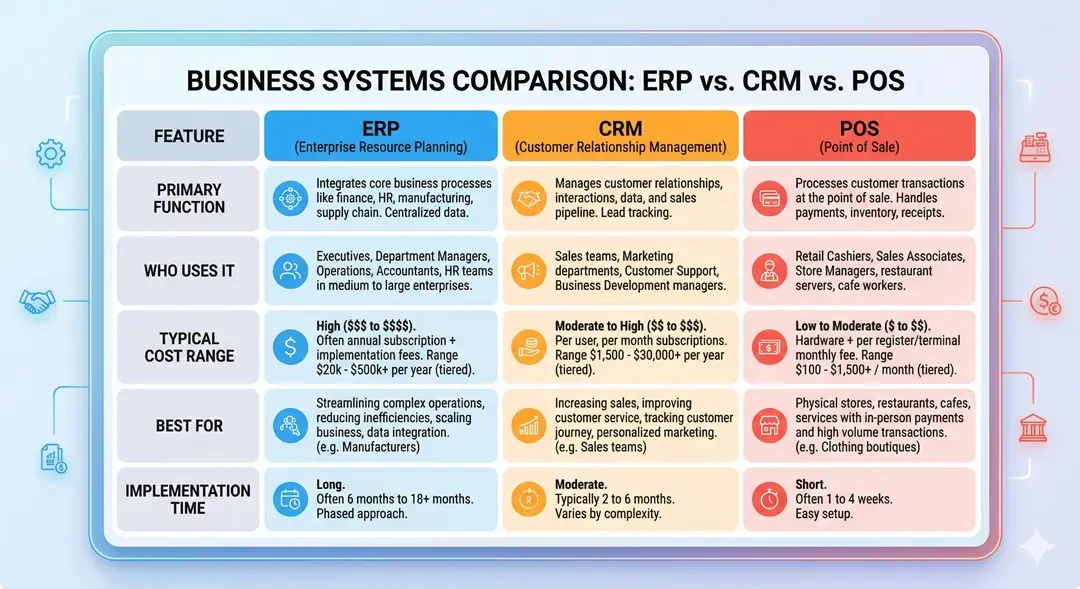
ERP costs are astronomical. An Odoo or Zoho One subscription for small businesses can run anywhere from INR 2000-₹8000 per user per month. Mid-market solutions like Microsoft Dynamics or NetSuite usually start at 15 lakh+ for implementation and ongoing licenses. Custom ERP in India typically costs ₹8-40 lakh depending on complexity, excluding recurring license fees.
CRM costs are overrated. Expect INR 1000-6000 per user per month for large SaaS CRMs. HubSpot, Salesforce and Zoho all follow this model. Custom CRM development starts from around ₹5-25 lakh.
POS Cost depends on whether you need hardware or not. The software alone runs ₹500-₹3000 per terminal per month. Complete setup including hardware can cost ₹50,000-₹3 lakh per site.
These are figures from 2026 – your actual costs depend heavily on your specific needs, scope and whether you choose off-the-shelf or custom development. For in-depth financial planning, Custom Software Development Cost in 2026 has detailed breakdowns by project type.
How to Decide Which One to Implement First
Here is the overview I give to every business owner who asks me this question:
If you are a retail or hospitality business and your current payment process is slow, error prone or not GST compliant, implement a POS first. POS is the fastest gain with the highest return for transaction-heavy businesses.
If your biggest problem is losing leads, no follow-up, or no visibility into your sales pipeline, implement a CRM first. CRMs are usually the fastest to implement and show ROI within 3-6 months.
If your operational clutter-inventory errors, financial reconciliation, data from multiple locations-is actively costing you money or preventing you from scaling, implement an ERP first. ERP is the biggest investment, but solves the biggest problems.
A useful rule of thumb: Most businesses should implement them in this order over 2-3 years - POS → CRM → ERP (for retail) or CRM → ERP → POS (for B2B). Trying to implement all three at once is the fastest way to stress out your team and waste money.
Off-the-Shelf vs Custom: The 2026 Reality
"Should I buy or build?" Debate is the only decision that has the greatest consequence in this area. Off-the-shelf software is quick to deploy, has community support and receives regular updates. Custom-built software fits your workflow exactly, has no recurring license fees and gives you complete ownership.
Honest answer in 2026: Off-the-shelf works for ~70% of businesses, custom is the right call for the other 30% - usually those with unique workflows, strict data ownership requirements, or those who have already outgrown standard tools. Don't let anyone (especially a software vendor) tell you that one is universally better.
Why This Matters More in 2026 Than Ever Before
Three things have changed the business management software landscape in the last two years. First, AI integration is now standard - modern ERPs predict inventory requirements, CRMs automatically score, and POS systems flag suspicious transactions in real time. Second, the cloud-first architecture has made enterprise-grade software available to SMBs at a fraction of historical costs. Third, regulatory complexity (GST changes, DPDP Act, e-invoicing) has made manual processes not only inefficient but also legally risky.
If you're still running your business on spreadsheets and disconnected tools in 2026, you're not just inefficient-you're exposed to competition and compliance risks. Those businesses that have built their operational foundations in the right way are flourishing this year.
Your Next Step
The right business management software stack can transform a disorganized operation into a scalable, data-driven business-but only if you choose wisely and implement carefully. Start by honestly reviewing where your biggest operational pain lies right now. This is where you start.
If you want an expert assessment of which system is best suited for your business, ConsoleOps specializes in customized and integrated ERP, CRM and POS solutions for Indian SMBs and Enterprises. We write software that actually fits the way companies operate - not the other way around.
Frequently Asked Questions
1. What is the difference between ERP, CRM, and POS software?
ERP (Enterprise Resource Planning) manages internal back-office operations like finance, inventory, HR, and supply chain. CRM (Customer Relationship Management) handles external customer-facing activities like sales pipelines, marketing, and support. POS (Point of Sale) processes in-person customer transactions, payments, and real-time inventory updates. They serve different functions but work best when integrated together into a single connected ecosystem.
2. How much does ERP software cost in India in 2026?
ERP costs vary widely based on your choice. Small business solutions like Odoo or Zoho One range from ₹2,000 to ₹8,000 per user per month. Mid-market platforms like Microsoft Dynamics 365 typically start at ₹15 lakh for implementation plus ongoing licenses. Custom-built ERPs cost between ₹8 lakh and ₹40 lakh depending on complexity, with no recurring license fees - making them cost-effective long-term for many growing businesses.
3. Which should I implement first - ERP, CRM, or POS?
It depends on your biggest pain point. Retail and hospitality businesses should implement POS first for the fastest ROI. B2B companies losing leads or struggling with sales visibility should start with CRM. Businesses drowning in operational chaos - inventory errors, finance reconciliation, multi-location data - should prioritize ERP. Most businesses benefit from a staged rollout over 2–3 years rather than implementing all three at once.
4. Should I choose custom-built or off-the-shelf business management software?
Off-the-shelf software works well for roughly 70% of businesses because it deploys faster, costs less upfront, and receives regular updates. Custom software is the right choice for the other 30% - businesses with unique workflows, strict data ownership requirements, compliance needs, or those who have outgrown standard tools. Custom solutions have higher upfront costs but no recurring license fees and give you complete ownership of your system.
5. Can ERP, CRM, and POS systems be integrated together?
Yes, and integration is where these systems deliver maximum ROI. When properly integrated, a sale at the POS automatically updates inventory in the ERP, syncs the customer record to the CRM, and reflects revenue in financial reports - all in real time. Integration typically requires custom API development and careful data mapping, but it eliminates manual data entry and gives you a unified view of your entire business.
6. What are the best ERP and CRM options for Indian SMEs in 2026?
For ERP, popular choices among Indian SMEs include Odoo, Zoho One, and Microsoft Dynamics 365 Business Central. For CRM, HubSpot, Zoho CRM, Salesforce, and Pipedrive dominate the market. Custom solutions built by Indian development companies are increasingly popular for businesses with specific workflows or compliance needs like GST e-invoicing and DPDP Act adherence.